Calls
The Calls section displays a list of calls you have added in the current network. The sidebar provides the ability to add, import, and sort (drag-and-drop) calls.
Each call is presented as an adaptive form with control and action panels, ensuring flexible management and easy configuration.
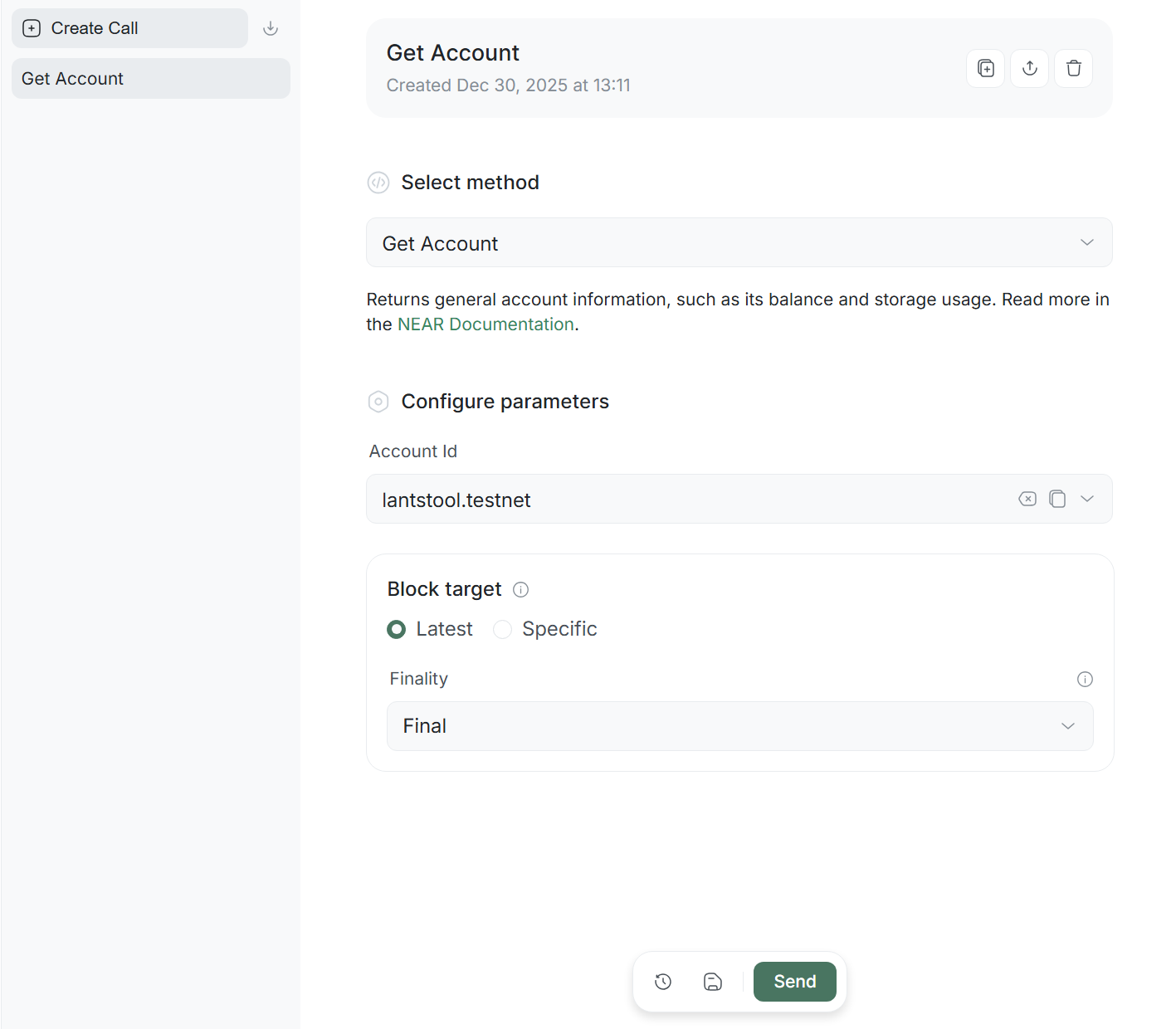
Call - consists of requests to an RPC node to retrieve data or check the state of the blockchain. Calls do not change the state of the network, do not require a key signature, and are performed for free (without Gas costs).
Select Method is the central control element containing a list of available RPC calls. Depending on the selected method, the form dynamically adapts, displaying only the necessary parameters for that specific call.
Creation and import
To start working, you must create a call; here are two options for how you can do it:
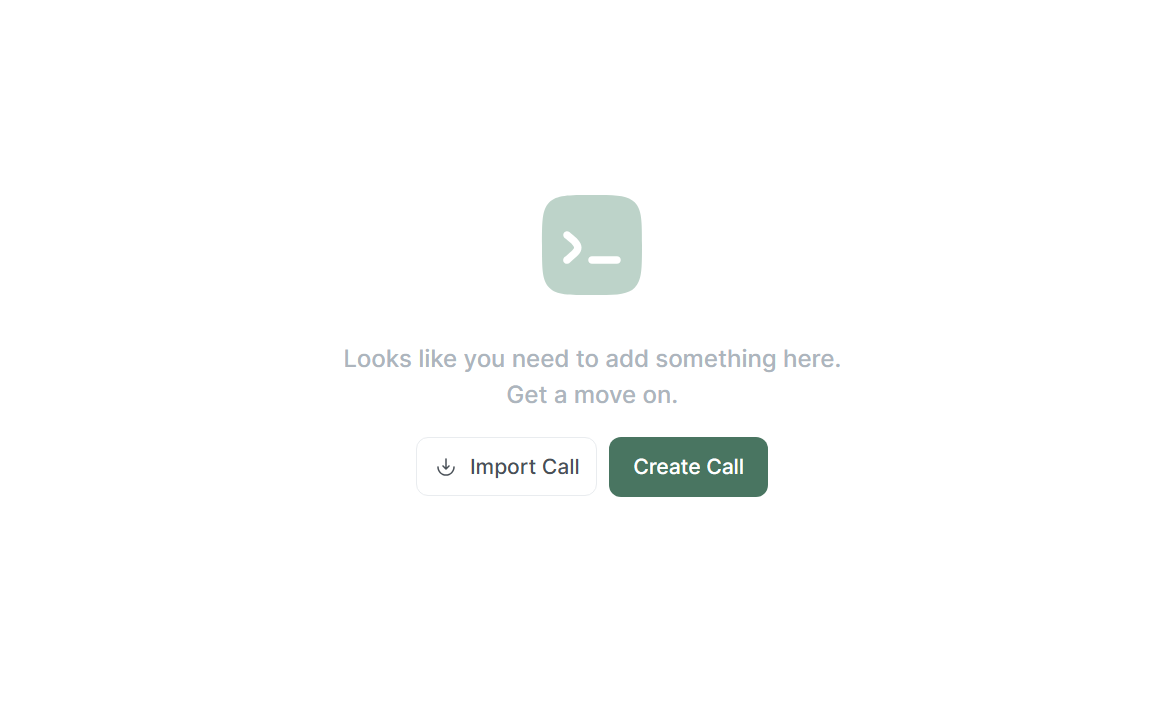
Create Call: Creates a new call and adds it to the list.Import Call: Allows you to load a ready-made call structure (by pasting JSON or uploading a file via Upload File).
The interface adapts depending on the presence of data:
- If your list of calls is empty, the Create and Import buttons are displayed in the center of the screen.
- As soon as you add at least one call, the Create and Import buttons will automatically move to the top of the sidebar (above the list of calls).
Control panel
Each call has a top control panel containing:

- Call name: Displays the name of the call. To change the name, click on it and enter a new one.
- Duplicate: Creates a full copy of the current call with the
copyprefix. - Export: Opens a modal window with export options:
- Copy JSON: Copy the code to the clipboard.
- Download JSON / .zip: Download the file to your device.
- Delete: Deletes the call from the list.
Action panel
An action panel is located at the bottom of the screen, containing:

- Revert changes: Cancels all unsaved changes, returning the call to the last saved state.
- Save changes: Saves the state of your call form.
- Send: Sends the RPC call to the network, automatically redirecting to the Result page.
- Open result: Opens the Result page (the button is active if the call has already been sent).
Methods and Parameters
This section contains a list of methods for interacting with the NEAR blockchain via RPC calls. All the methods listed below are intended for reading data and do not require gas costs. The main field is Select Method, where you can choose one of the 24 available RPC methods.
State Saving: You can freely switch between methods in the list. Lantstool remembers the entered values for each method separately. Data does not disappear when changing the method in Select Method.
1. Account
Get Account
Returns general information about an account, such as its balance and storage usage.
Parameters:
- Account Id: the account identifier (e.g.,
alice.testnet). - Latest:
- Finality: choosing the degree of confirmation of the last block.
- Specific:
- Block Id: a unique block identifier that accepts Hash or Height.
Get Account Changes
Returns a list of account state changes that occurred in a specific block—such as balance updates or changes in storage usage. Allows retrieving changes for multiple accounts simultaneously.
Parameters:
- Account Id: account identifiers (e.g.,
alice.testnet). - Latest:
- Finality: choosing the degree of confirmation of the last block.
- Specific:
- Block Id: a unique block identifier that accepts Hash or Height.
2. Contract
Get Contract WASM
Returns the deployed WASM contract associated with the account in base64 format.
Parameters:
- Contract Id: the contract account identifier (e.g.,
contract.testnet). - Latest:
- Finality: choosing the degree of confirmation of the last block.
- Specific:
- Block Id: a unique block identifier that accepts Hash or Height.
Get Contract WASM Changes
Returns modifications made to the contract code in a specific block. Allows retrieving changes for multiple accounts simultaneously.
Parameters:
- Contract Id: the contract account identifier (e.g.,
contract.testnet). - Latest:
- Finality: choosing the degree of confirmation of the last block.
- Specific:
- Block Id: a unique block identifier that accepts Hash or Height.
Get Contract State
Returns the contract state (key-value pairs) encoded in base64. To get human-readable data, it is necessary to additionally convert this information using the Borsh schema obtained from the contract state structure. You can also filter the state by a specific key prefix (the prefix is defined in the contract code for collections such as Lookup Map).
Parameters:
- Contract Id: the contract account identifier.
- Key Prefix: prefix for filtering state using a specific key. Automatically converted to base64.
- Latest:
- Finality: choosing the degree of confirmation of the last block.
- Specific:
- Block Id: a unique block identifier that accepts Hash or Height.
Get Contract State Changes
Returns contract state changes (key-value pairs) that occurred in a specific block. Allows retrieving changes for multiple accounts simultaneously. You can also filter results by the specified key prefix (the prefix is defined in the contract code for collections such as Lookup Map).
Parameters:
- Contract Id: the contract account identifier (e.g.,
contract.testnet). - State Prefix: prefix for filtering state using a specific key. Automatically converted to base64.
- Latest:
- Finality: choosing the degree of confirmation of the last block.
- Specific:
- Block Id: a block identifier that accepts Hash or Height.
Call Contract View Methods
Calls a view (read-only) method of a contract. This method cannot be used to execute transactions (write methods).
Parameters:
- Contract Id: the contract account identifier.
- Method: the name of the contract function to be called.
- Arguments: arguments for the method in JSON5 format.
- Latest:
- Finality: choosing the degree of confirmation of the last block.
- Specific:
- Block Id: a block identifier that accepts Hash or Height.
3. Keys
Get Account Key
Returns full information about a specific account key, including detailed information such as nonce and permission.
Parameters:
- Account Id: the account identifier (e.g.,
alice.testnet). - Public Key: the account’s public key (starts with
ed25519:). - Latest:
- Finality: choosing the degree of confirmation of the last block.
- Specific:
- Block Id: a block identifier that accepts Hash or Height.
Get Changes for Account Key
Returns changes associated with a specific account key in a given block (e.g., nonce updates). Allows retrieving changes for multiple account-key pairs simultaneously.
Parameters:
- Account Id: the account identifier (e.g.,
alice.testnet). - Public Key: the account’s public key.
- Latest:
- Finality: choosing the degree of confirmation of the last block.
- Specific:
- Block Id: a block identifier that accepts Hash or Height.
Get Account Keys
Returns a list of all account access keys with detailed information about each, including nonce and permission.
Parameters:
- Account Id: the account identifier (e.g.,
alice.testnet). - Latest:
- Finality: choosing the degree of confirmation of the last block.
- Specific:
- Block Id: a block identifier that accepts Hash or Height.
Get Changes for Account Keys
Returns changes for all access keys within a specific block. Allows retrieving changes for multiple accounts simultaneously.
Parameters:
- Account Id: the account identifier (e.g.,
alice.testnet). - Latest:
- Finality: choosing the degree of confirmation of the last block.
- Specific:
- Block Id: a block identifier that accepts Hash or Height.
4. Block
Get Block
Returns a block with short information about its chunks (without details about transactions or receipts).
Parameters:
- Latest:
- Finality: choosing the degree of confirmation of the last block.
- Specific:
- Block Id: a block identifier that accepts Hash or Height.
Get Block Changes
Returns a list of changes in the form of “account — change type” pairs that occurred within a block.
Parameters:
- Latest:
- Finality: choosing the degree of confirmation of the last block.
- Specific:
- Block Id: a block identifier that accepts Hash or Height.
Get Chunk
Returns full information about a chunk along with short information about its transactions and receipts.
Parameters:
- By Chunk Id:
- Chunk Id: the chunk identifier.
- In Block:
- Block Id: block hash or height.
- Shard Id: shard sequence number.
5. Transaction
Get Transaction
Returns a transaction summary (without receipts).
Parameters:
- Transaction Hash: the transaction hash.
- Signer Id: the sender’s account identifier (e.g.,
alice.testnet). - Wait Until: degree of execution wait.
Get Detailed Transaction
Returns the final result of transaction execution and details of all receipts.
Parameters:
- Transaction Hash: the transaction hash.
- Signer Id: the sender’s account identifier.
- Wait Until: degree of execution wait.
Get Receipt
Retrieves a receipt by its identifier (in raw form, without status or execution result).
Parameters:
- Receipt Id: the receipt identifier.
6. Protocol
Get Genesis Protocol
Returns the current genesis configuration (the initial state of the network).
Get Protocol Config
Returns the most up-to-date protocol configuration or data for a specific block. Useful for determining current data storage costs and transaction fees.
Parameters:
- Latest:
- Finality: choosing the degree of confirmation of the last block.
- Specific:
- Block Id: a block identifier that accepts Hash or Height.
7. Network
Get Network Info
Returns the current state of the node’s network connections (active peers, volume of transmitted data, etc.).
Get Node Status
Returns the general status of the specific node’s state, including synchronization state, nearcore version, protocol version, and the current set of validators.
Get Gas Price
Returns the gas price in a specific block.
Parameters:
- Latest: request for the latest block.
- Specific:
- Block Id: a block identifier that accepts Hash or Height.
8. Validators
Get Validators
Returns information about all validators for a specific epoch.
Parameters:
- Latest: request for the current epoch.
- Specific:
- Epoch Id: epoch identifier that accepts Hash to request a specific past epoch.
Get Maintenance Windows
Returns the scheduled maintenance windows for a specific validator during the current epoch. These “windows” are block height ranges during which the validator is not required to generate blocks or chunks. If the specified account is not a validator, the method will return the range from the current moment until the end of the epoch.
Parameters:
- Validator Id: the validator’s account identifier (e.g.,
node0).
Finality and Wait Until
Finality
The Finality parameter defines the level of guarantee that the data in the selected block will not be changed. You can choose one of three levels:
- Optimistic: The transaction is in a block that—while unlikely—could be skipped (~1 second after sending).
- Near Final: The transaction is in a block that is irreversible, unless at least one block producer is subject to slashing (~2 seconds after sending).
- Final: The transaction is in a block that is final and irreversible (~3 seconds after sending).
Near Final provides sufficient guarantees for any regular operations, so it should be prioritized in most cases due to faster confirmation compared to Final.
Wait Until
The Wait Until parameter defines the stage of the transaction lifecycle at which the RPC should return a response:
- None: The transaction is accepted by the RPC node and is waiting to be included in a block. It hasn’t started executing yet, although this usually happens in the next block.
- Included: The transaction has reached a validator who verifies the signature’s compliance with the access key, deducts prepayment for gas, and updates the key’s nonce. The transaction is included in a chunk/block and converted into one receipt for execution. At this stage, execution results, logs, and outcomes are not yet available.
- Executed Optimistic: In subsequent blocks, the receipt is executed (may create new receipts for cross-contract interactions). The RPC returns a response when all receipts have finished execution. Blocks at this point may not yet be finalized.
- Included Final: The block containing the transaction has been finalized. This can happen even earlier than the execution of all receipts is completed (depending on the number of cross-contract calls).
- Executed: A state when both conditions are met — IncludedFinal and ExecutedOptimistic. The block with the transaction is finalized, and all receipts have finished execution.
- Final: The RPC returns a response when the blocks containing the transaction and absolutely all of its receipts have received finalized status.
Result
After clicking the Send button, Lantstool sends the RPC call. You will be automatically redirected to the Result page, where a detailed response will be displayed.
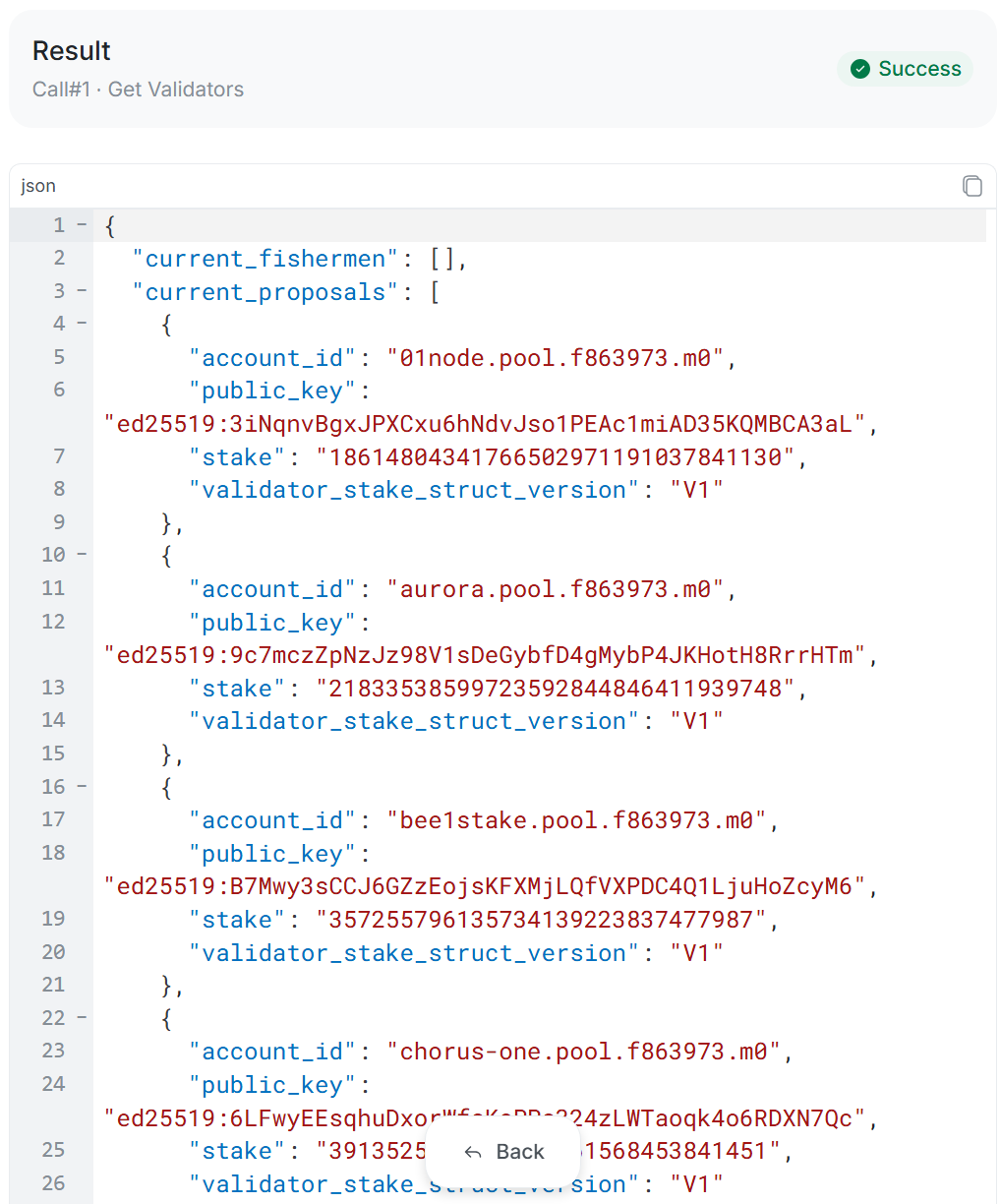
- Call Name and Method Name: Displays
[The Name of Your Call] and [The Name of the method called]. - Status Badge: Call status indicator:
- Success: The call was successfully executed.
- Error: An error occurred.
- JSON Response: Full response code in JSON format.